

[Full-Version] 2026 New NSE4_FGT_AD-7.6 Actual Exam Dumps, Fortinet Practice Test
Study HIGH Quality NSE4_FGT_AD-7.6 Free Study Guides and Exams Tutorials
NEW QUESTION # 21
An administrator configures FortiGuard servers as DNS servers on FortiGate using default settings.
What is true about the DNS connection to a FortiGuard server?
- A. It uses UDP 8888.
- B. It uses UDP 53.
- C. It uses DNS over TLS.
- D. It uses DNS over HTTPS.
Answer: C
Explanation:
When using FortiGuard servers for DNS, FortiOS uses DNS over TLS (DoT) by default to secure the DNS traffic. New FortiGuard DNS servers have been added as primary and secondary servers.
NEW QUESTION # 22
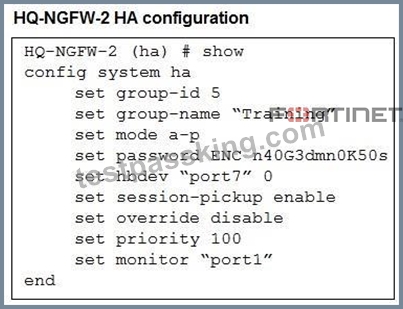
Refer to the exhibits. An administrator configured both members of an HA cluster at the same time. After one week of monitoring, the administrator wants to verify the HA failover performance.
How can the administrator force a failover?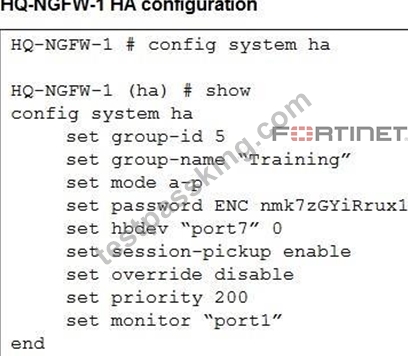
- A. The administrator must set the parameter override to enable on HQ-NGFW-2.
- B. The administrator must set the monitored port to down on HQ-NGFW-1.
- C. The administrator must increase the HA priority on HQ-NGFW-2.
- D. The administrator must reset the HA uptime on HQ-NGFW-1.
Answer: B
Explanation:
Both FortiGates are in an active-passive (a-p) HA cluster with override disabled. This means failover is triggered only if the primary (HQ-NGFW-1) becomes unavailable or monitored interfaces fail. To test failover performance, the administrator can set the monitored interface (port1) down on HQ-NGFW-1, which will force a failover to HQ-NGFW-2.
NEW QUESTION # 23
Refer to the exhibit.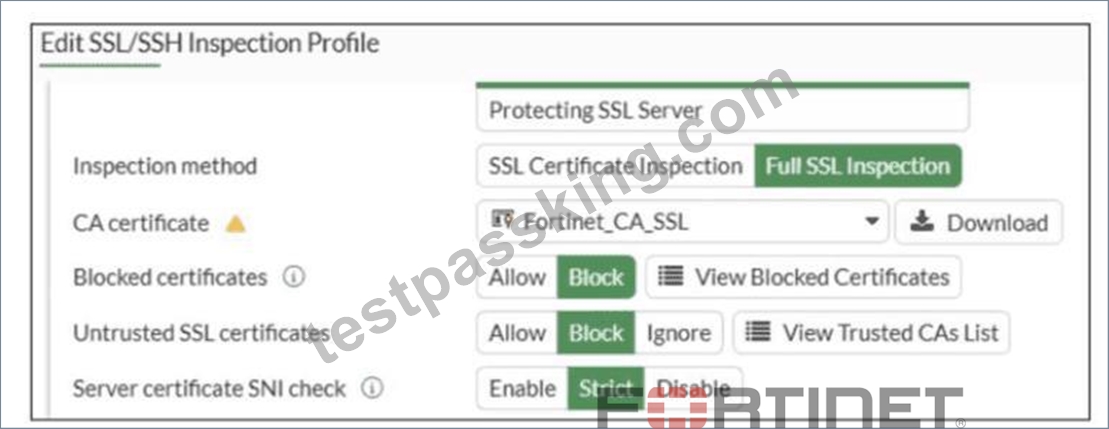
What would be the impact of these settings on the Server certificate SNI check configuration on FortiGate?
- A. FortiGate will accept the connection with a warning if the SNI does not match the CN or SAN fields.
- B. FortiGate will accept and use the CN in the server certificate for URL filtering if the SNI does not match the CN or SAN fields.
- C. FortiGate will close the connection if the SNI does not match the CN or SAN fields.
- D. FortiGate will close the connection if the SNI does not match the CN and SAN fields
Answer: C
Explanation:
Based on the exhibit and the FortiOS 7.6 SSL/SSH Inspection documentation, the correct answer is C.
Understanding the Exhibit Configuration
In the SSL/SSH Inspection Profile, the following settings are shown:
Inspection method: Full SSL Inspection
Server certificate SNI check: Strict
This setting directly controls how FortiGate validates the Server Name Indication (SNI) provided by the client during the TLS handshake.
FortiOS 7.6 Behavior of "Server certificate SNI check"
FortiOS supports three modes for Server certificate SNI check:
Disable
No validation between SNI and server certificate.
Enable
FortiGate checks SNI against the certificate.
If mismatch occurs, FortiGate may still allow the session with reduced validation.
Strict
FortiGate enforces a strict match.
The SNI must match either the CN (Common Name) or one of the SAN (Subject Alternative Name) entries in the server certificate.
If the SNI does not match either CN or SAN, the TLS session is immediately terminated.
The exhibit clearly shows Strict selected.
Why Option C is Correct
With Strict enabled, FortiGate rejects the TLS connection when:
The SNI does not match the CN, and
The SNI does not match any SAN entry
This results in the connection being closed, not allowed with warnings or fallback behavior.
Therefore:
C). FortiGate will close the connection if the SNI does not match the CN or SAN fields is exactly the documented behavior.
Why the Other Options Are Incorrect
A: FortiGate does not fall back to using the CN for URL filtering when Strict is enabled.
B: There is no "accept with warning" behavior in Strict mode.
D: Incorrect logical condition. FortiGate does not require mismatch with both CN and SAN simultaneously; a mismatch with either valid field set is sufficient to close the connection.
NEW QUESTION # 24
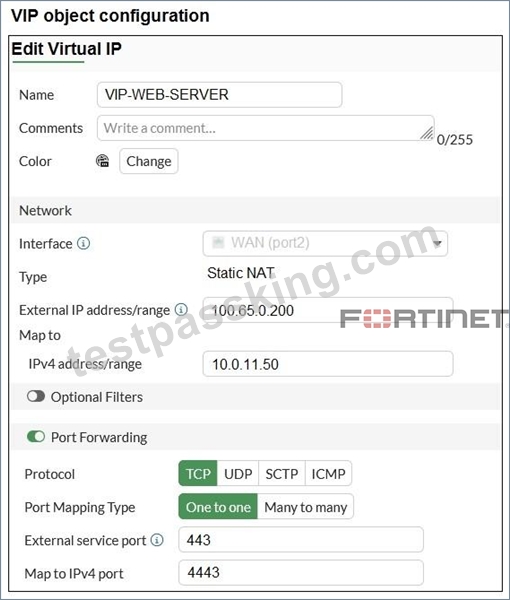
Refer to the exhibits. A diagram of a FortiGate device connected to the network VIP object and firewall policy configurations are shown.
The WAN (port2) interface has the IP address 100.65.0.101/24.
The LAN (port4) interface has the IP address 10.0.11.254/24.
If the host 100.65.1.111sends a TCP SYN packet on port 443 to 100.65.0.200, what will the source address, destination address, and destination port of the packet be at the time FortiGate forwards the packet to the destination?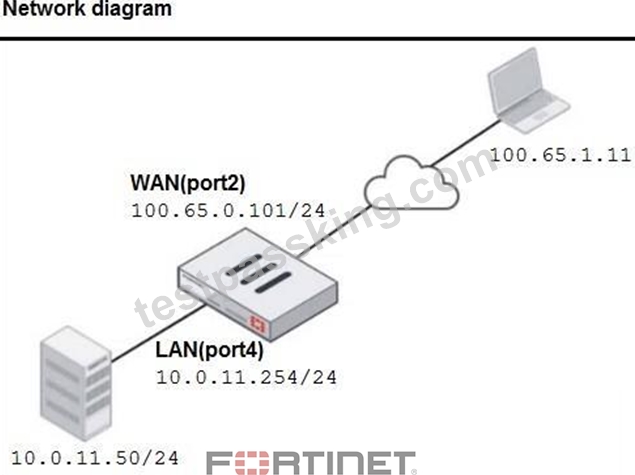

- A. 100.65.1.111, 10.0.11.50, and 4443, respectively
- B. 10.0.11.254, 10.0.15.50, and 4443, respectively
- C. 100.65.1.111, 10.0.11.50and 443, respectively
- D. 10.0.11.254, 100.65.0.200, and 443, respectively
Answer: A
Explanation:
The VIP object maps the external IP 100.65.0.200:443 to the internal server 10.0.11.50:4443.
Since NAT is disabled on the firewall policy, the source IP is preserved.
So, when host 100.65.1.111 connects to 100.65.0.200:443:
- The source remains 100.65.1.111.
- The destination IP is translated to 10.0.11.50.
- The destination port is translated to 4443.
NEW QUESTION # 25
Refer to the exhibit. Which algorithm does SD-WAN use to distribute traffic that does not match any of the SD-WAN rules?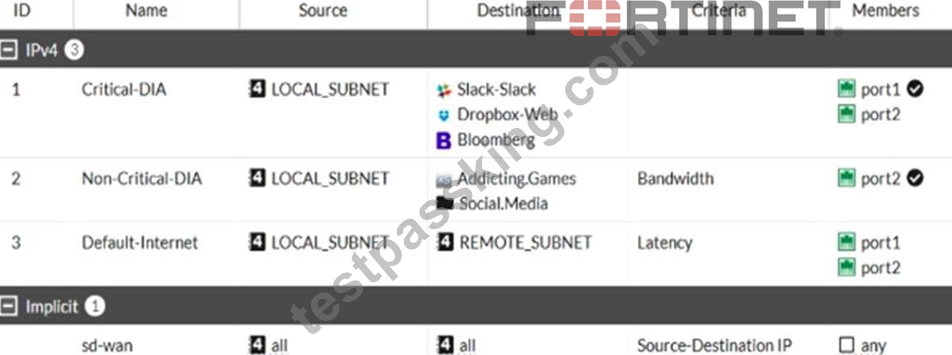
- A. Traffic is distributed based on the number of sessions through each interface.
- B. Traffic is sent to the link with the lowest latency.
- C. All traffic from a source IP is sent to the same interface
- D. All traffic from a source IP to a destination IP is sent to the same interface.
Answer: D
Explanation:
For traffic that does not match any of the defined SD-WAN rules, the default implicit SD-WAN rule is applied. By default, the FortiGate uses a "source-destination IP-based" algorithm, which means all traffic from a specific source IP to a specific destination IP is sent through the same interface.
This ensures that a consistent path is used for traffic between the same source and destination IP addresses.
NEW QUESTION # 26
An administrator manages a FortiGate model that supports NTurbo
How does NTurbo acceleration enhance antivirus performance?
- A. For proxy-based inspection. NTurbo offloads traffic to the content processor.
- B. For proxy-based inspection. NTurbo buffers the whole file and then sends it to the antivirus engine.
- C. For flow-based inspection. NTurbo creates two inspection sessions on the FortiGate device.
- D. For flow-based inspection. NTurbo establishes a dedicated data path to redirect traffic between the IPS engine and FortiGate ingress and egress interfaces.
Answer: D
Explanation:
According to the FortiOS 7.6 Administration Guide and Fortinet hardware acceleration (NTurbo) documentation, the correct answer is A.
What NTurbo Is (FortiOS 7.6 - Verified)
NTurbo is a hardware-based acceleration feature available on specific FortiGate models. It is designed to improve antivirus and IPS performance when operating in flow-based inspection mode.
NTurbo works by creating a fast, optimized data path between:
FortiGate ingress interface
IPS/AV engine
FortiGate egress interface
This minimizes CPU involvement and reduces packet traversal overhead.
Why Option A Is Correct
A . For flow-based inspection, NTurbo establishes a dedicated data path to redirect traffic between the IPS engine and FortiGate ingress and egress interfaces.
This is exactly how NTurbo works, as documented:
NTurbo applies to flow-based inspection only
It accelerates IPS and antivirus scanning
It creates a dedicated fast path that bypasses unnecessary processing steps This significantly improves throughput and lowers latency This description matches Fortinet's official explanation of NTurbo.
Why the Other Options Are Incorrect
B . NTurbo creates two inspection sessions
Incorrect. NTurbo does not duplicate sessions; it optimizes the packet path.
C . NTurbo offloads traffic to the content processor (proxy-based)
Incorrect. NTurbo does not apply to proxy-based inspection and does not offload to content processors.
D . NTurbo buffers the whole file and then sends it to the antivirus engine Incorrect. Buffering entire files is a proxy-based behavior, not NTurbo.
NEW QUESTION # 27
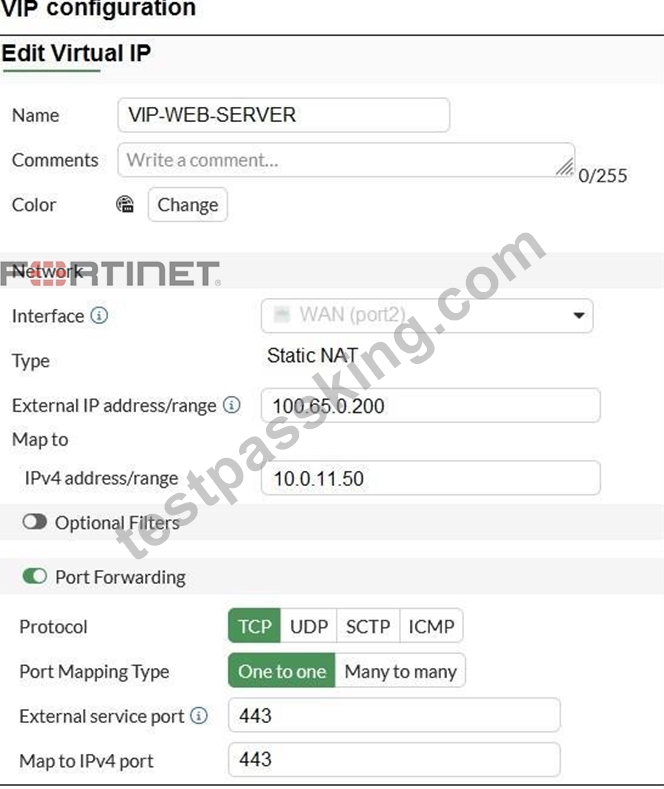
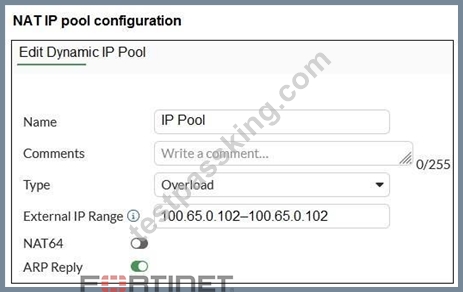
Refer to the exhibits. The exhibits show a diagram of a FortiGate device connected to the network, and the firewall policies, VIP, and IP pool configurations on the FortiGate device.
The WAN (port2) interface has the IP address 100.65.0.101/24.
The LAN (port4) interface has the IP address 10.0.11.254/24.
The first firewall policy has NAT enabled using the IP pool. The second firewall policy is configured with a VIP as the destination address.
Which IP address will be used to source NAT (SNAT) the internet traffic coming from a workstation with the IP address 10.0.11.50?
- A. 100.65.0.102
- B. 100.65.0.200
- C. 100.65.0.101
- D. 10.0.11.254
Answer: A
Explanation:
Traffic from the workstation 10.0.11.50 going to the internet matches the Internet(1) policy (LAN
→ WAN) which has NAT enabled and is configured to use the IP Pool. The IP pool specifies the external address 100.65.0.102.
FortiGate will perform source NAT (SNAT) on the outbound traffic, translating the source IP of the workstation to 100.65.0.102.
NEW QUESTION # 28
Refer to the exhibits.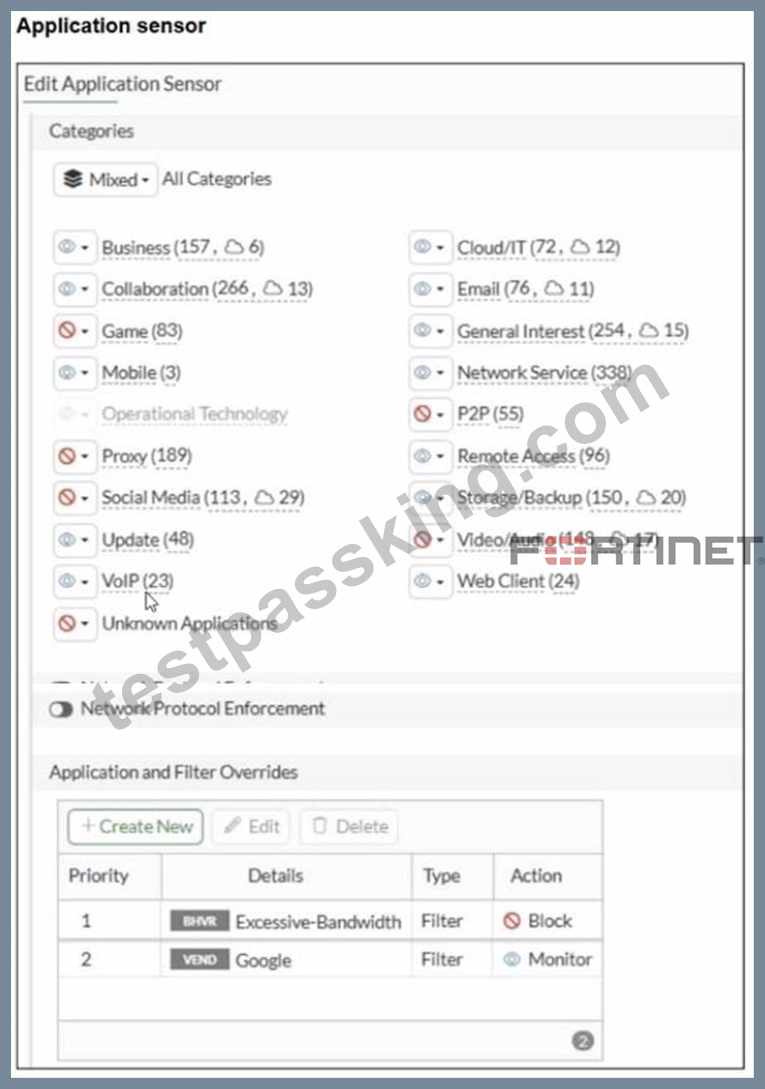
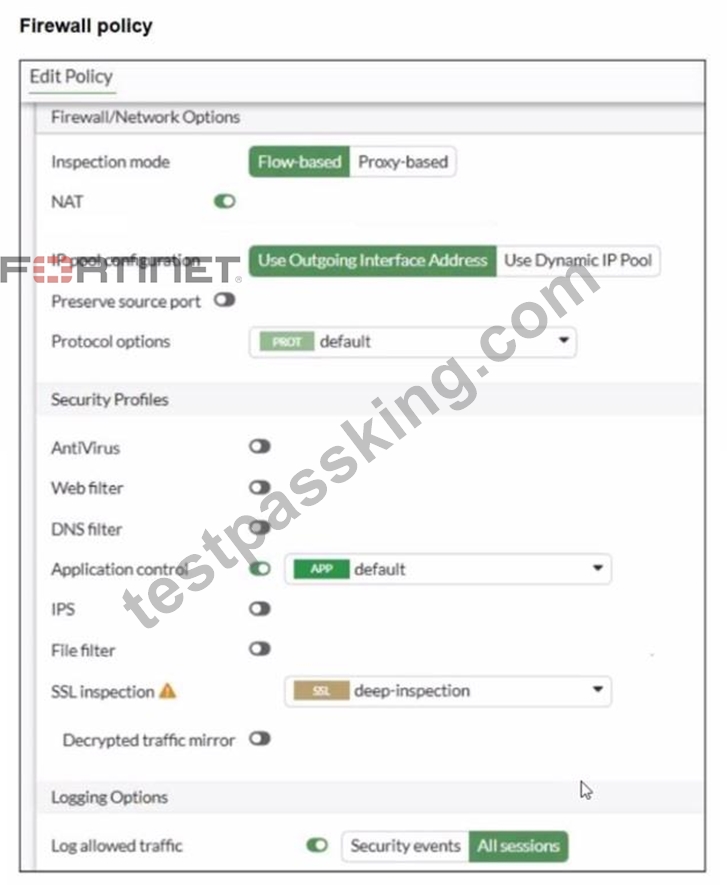
You have implemented the application sensor and the corresponding firewall policy as shown in the exhibits.
Which two factors can you observe from these configurations? (Choose two.)
- A. YouTube access is blocked based on Excessive-Bandwidth Application and Filter override settings.
- B. Facebook access is blocked based on the category filter settings.
- C. Facebook access is allowed but you cannot play Facebook videos based on Video/Audio category filter settings.
- D. YouTube search is allowed based on the Google Application and Filter override settings.
Answer: A,B
Explanation:
From the exhibits:
The Application Control sensor has these key settings:
Application and Filter Overrides
Priority 1: Excessive-Bandwidth (Type: Filter) with Action Block
Priority 2: Google (Type: Filter) with Action Monitor
Category actions shown include Social Media set to Block (this category includes Facebook).
The firewall policy is using:
Flow-based inspection
Application control enabled (profile: default)
Deep inspection enabled (helps identify applications inside HTTPS)
Logging enabled
FortiOS applies Application Control as follows (top-down within the Application Control profile):
Overrides are evaluated by priority (highest priority first).
The first matching override determines the action (block/monitor/allow) for that traffic.
Category-based actions apply to applications that fall into those categories unless an override matches first.
Why A is correct
A . YouTube access is blocked based on Excessive-Bandwidth Application and Filter override settings.
The profile explicitly blocks the Excessive-Bandwidth behavior filter at the highest override priority.
When YouTube traffic is detected as matching the Excessive-Bandwidth behavior, FortiGate will apply the Block action due to the override.
Because this is a priority override, it is enforced before lower-priority entries.
Why B is correct
B . Facebook access is blocked based on the category filter settings.
The Application Sensor shows Social Media configured with a Block action.
Facebook is categorized under Social Media, so it will be blocked when matched by Application Control.
Why C is not correct
C . Facebook access is allowed but you cannot play Facebook videos...
Since the Social Media category is set to Block, Facebook would be blocked at the category level (not merely video playback).
Why D is not correct
D . YouTube search is allowed based on the Google override...
The Google override action is Monitor, not Allow.
"Monitor" logs/detects but does not override a block condition to "allow" traffic.
Also, YouTube traffic is not guaranteed to be treated as "Google" in a way that would permit it, and any matching block condition (such as Excessive-Bandwidth) would still take precedence.
NEW QUESTION # 29
Refer to the exhibit. Which two statements are true about the routing entries in this database table? (Choose two.)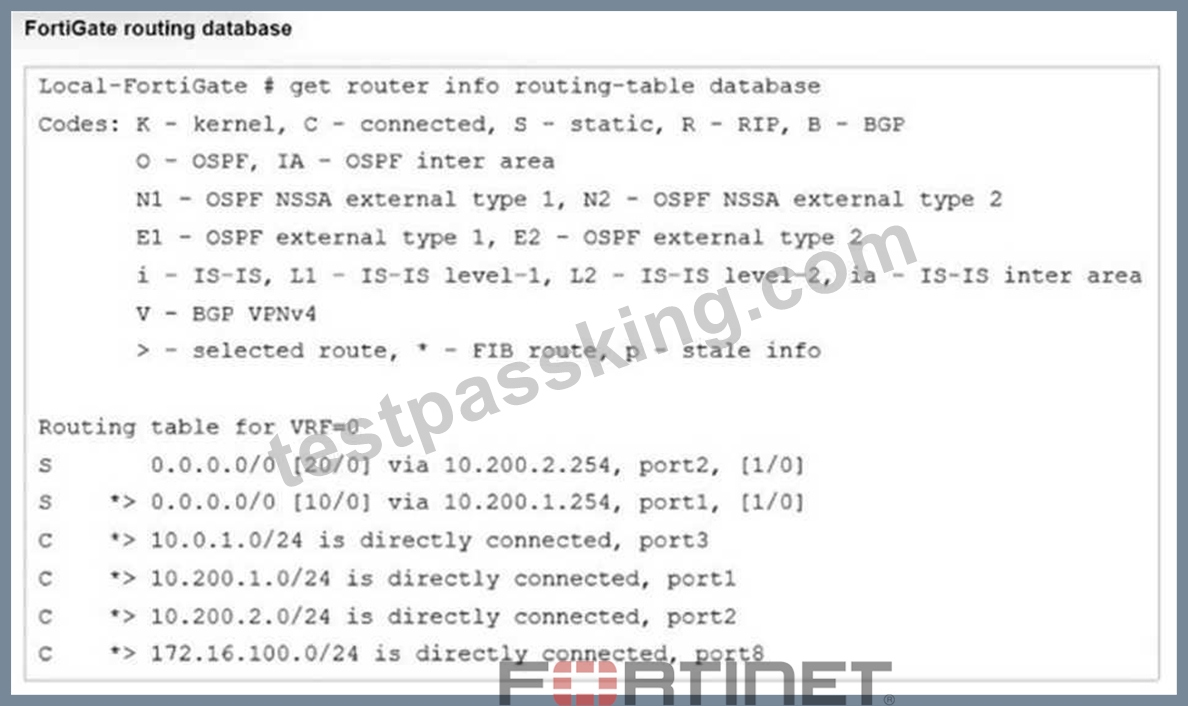
- A. Both default routes have different administrative distances.
- B. The port2 interface is marked as inactive.
- C. The default route on port2 is marked as the standby route.
- D. All of the entries in the routing database table are installed in the FortiGate routing table.
Answer: A,C
Explanation:
The routing table in the exhibit shows two default routes (0.0.0.0/0) with different administrative distances:
The default route through port2 has an administrative distance of 20. The default route through port1 has an administrative distance of 10. Administrative distance determines the priority of the route; a lower value is preferred. Here, the route through port1 with an administrative distance of
10 is the preferred route. The route through port2 with an administrative distance of 20 acts as a standby or backup route. If the primary route (port1) fails or is unavailable, traffic will then be routed through port2. Regarding the statement that the port2 interface is marked as inactive, there is no indication in the routing table that port2 is inactive. Similarly, all the routes displayed are not necessarily installed in the FortiGate routing table, as the table could include both active and backup routes.
NEW QUESTION # 30
An administrator has configured a dialup IPsec VPN on FortiGate with add-route enabled.
However, the static route is not showing in the routing table.
Which two statements about this scenario are correct? (Choose two.)
- A. The administrator must enable a dynamic routing protocol on the dialup interface.
- B. The administrator must use a policy route instead of a static route for add-route to work properly.
- C. The administrator must define the remote network correctly in the phase 2 selectors.
- D. The administrator must ensure phase 2 is successfully established.
Answer: C,D
Explanation:
The administrator must ensure phase 2 is successfully established → The static route for the dialup VPN is only added after Phase 2 negotiation completes successfully.
The administrator must define the remote network correctly in the phase 2 selectors → The add- route feature installs a route based on the Phase 2 selectors; if they are incorrect, no route will appear in the routing table.
NEW QUESTION # 31
An employee needs to connect to the office through a high-latency internet connection.
Which SSL VPN setting should the administrator adjust to prevent SSL VPN negotiation failure?
- A. SSL VPN login-timeout
- B. SSL VPN idle-timeout
- C. SSL VPN session-ttl
- D. SSL VPN dtls-hello-timeout
Answer: A
Explanation:
When connected to SSL VPN over high latency connections, FortiGate can time out the client before the client can finish the negotiation process, such as DNS lookup and time to enter a token. Two new CLI commands under config vpn ssl settings have been added to address this.
The first command allows you to set up the login timeout, replacing the previous hard timeout value. The second command allows you to set up the maximum DTLS hello timeout for SSL VPN connections.
NEW QUESTION # 32
You have created a web filter profile named restrictmedia-profile with a daily category usage quota.
When you are adding the profile to the firewall policy, the restrict_media-profile is not listed in the available web profile drop down.
What could be the reason?
- A. The inspection mode in the firewall policy is not matching with web filter profile feature set.
- B. The web filter profile is already referenced in another firewall policy.
- C. The firewall policy is in no-inspection mode instead of deep-inspection.
- D. The naming convention used in the web filter profile is restricting it in the firewall policy.
Answer: A
Explanation:
In FortiOS 7.6, web filter profiles are inspection-mode dependent. Certain advanced web filtering features-such as daily category usage quota-are only supported when the firewall policy is operating in proxy-based inspection mode.
Why the profile is not visible
The profile restrictmedia-profile includes a daily category usage quota.
Daily quotas are a proxy-based web filtering feature.
If the firewall policy is configured with:
Inspection mode: Flow-based
Then FortiGate will not display proxy-only web filter profiles in the Web Filter drop-down list.
FortiGate automatically filters the available profiles based on feature compatibility with the policy's inspection mode.
This behavior is explicitly documented in the FortiOS 7.6 Web Filtering and Inspection Mode Compatibility sections.
Why the other options are incorrect
A . Already referenced in another firewall policy
Web filter profiles can be reused across multiple policies. This does not hide them.
B . Firewall policy is in no-inspection mode instead of deep-inspection SSL inspection depth affects HTTPS visibility, not whether a web filter profile appears in the drop-down list.
C). Naming convention restriction
FortiOS does not restrict profile selection based on naming conventions.
NEW QUESTION # 33
The HTTP inspection process in web filtering follows a specific order when multiple features are enabled in the web filter profile.
Which order must FortiGate use when the web filter profile has features such as safe search enabled?
- A. Static URL filter, FortiGuard category filter, and advanced filters
- B. FortiGuard category filter and rating filter
- C. DNS-based web filter and proxy-based web filter
- D. Static domain filter, SSL inspection filter, and external connectors filters
Answer: A
Explanation:
Remember that the web filtering profile has several features. So, if you have enabled many of them, the inspection order flows as follows:
1. The local static URL filter
2. FortiGuard category filtering (to determine a rating)
3. Advanced filters (such as safe search or removing Active X components).
NEW QUESTION # 34
You have configured an application control profile, set peer-to-peer traffic to Block under the Categories tab, and applied it to the firewall policy. However, your peer-to-peer traffic on known ports is passing through the FortiGate without being blocked. What FortiGate settings should you check to resolve this issue?
- A. Replacement Messages for UDP-based Applications
- B. Application and Filter Overrides
- C. FortiGuard category ratings
- D. Network Protocol Enforcement
Answer: D
Explanation:
Network Protocol Enforcement settings control how FortiGate inspects and enforces protocols on traffic, including peer-to-peer applications on known ports. If not properly enabled, peer-to-peer traffic may bypass blocking despite the application control profile.
NEW QUESTION # 35
Which method allows management access to the FortiGate CLI without network connectivity?
- A. Telnet console
- B. Serial console
- C. CLI console widget
- D. SSH console
Answer: B
Explanation:
The serial console provides direct physical access to the FortiGate CLI without requiring any network connectivity. It connects via the FortiGate's console port using a serial cable, allowing administrators to perform initial configuration, recovery, or troubleshooting even if the network interfaces are down or misconfigured.
NEW QUESTION # 36
Refer to the exhibits. The exhibits show a diagram of a FortiGate device connected to the network, and the firewall configuration.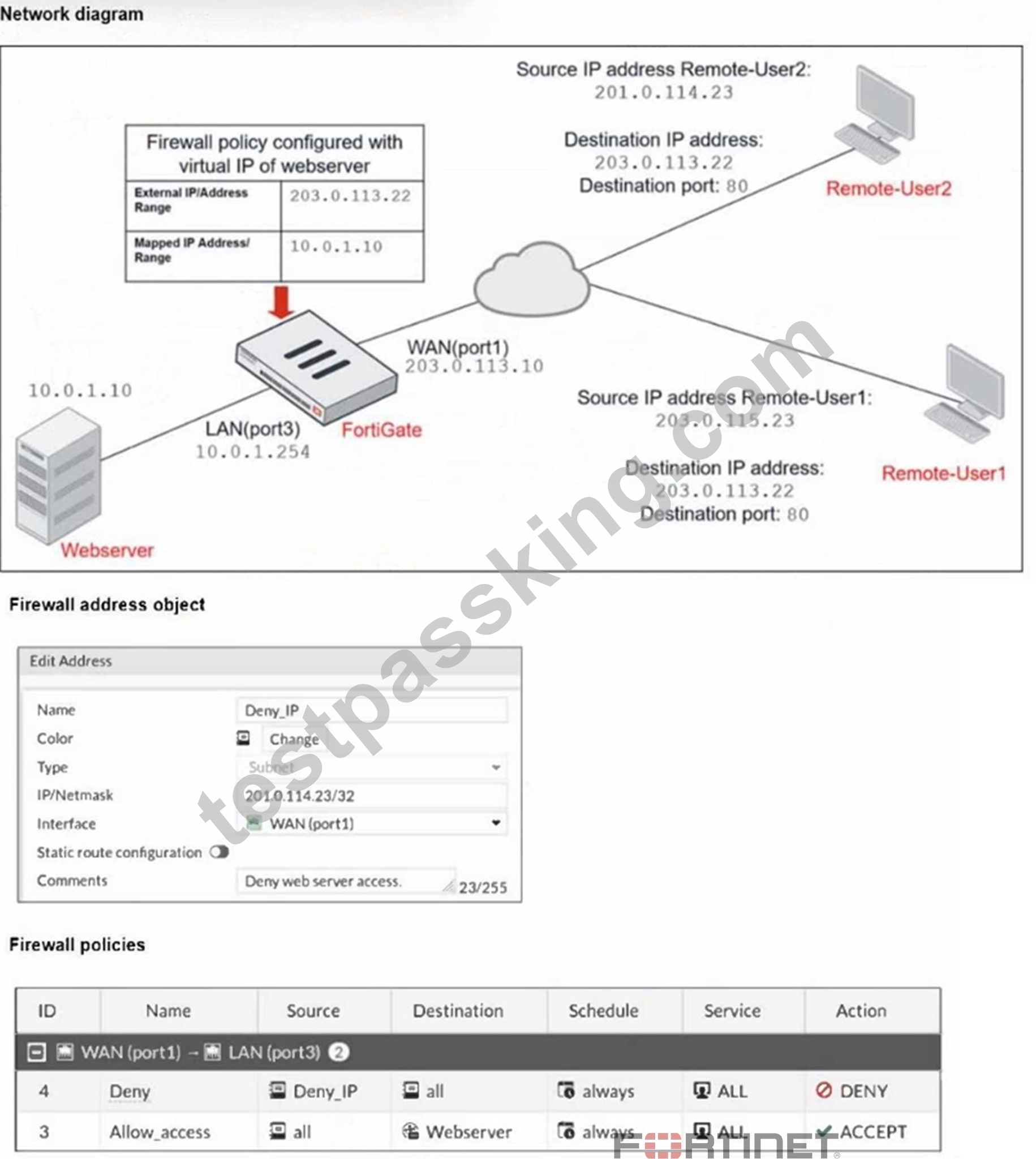
An administrator created a Deny policy with default settings to deny Webserver access for Remote-User2.
The policy should work such that Remote-User1 must be able to access the Webserver while preventing Remote-User2 from accessing the Webserver.
Which additional configuration can the administrator add to a deny firewall policy, beyond the default behavior, to block Remote-User2 from accessing the Webserver?
- A. Set the Destination address as Webserver in the Deny policy.
- B. Configure a One-to-One IP Pool object in a new policy.
- C. Set the Destination address as Deny_IP in the Allow_access policy.
- D. Disable match-vip in the Allow_access policy
Answer: A
Explanation:
To block Remote-User2's access to the Webserver, the deny policy must explicitly specify the Webserver as the destination address; otherwise, it denies traffic to all destinations, which is not the desired behavior.
NEW QUESTION # 37
You have configured an application control profile, set peer-to-peer traffic to Block under the Categories tab.
and applied it to the firewall policy. However, your peer-to-peer traffic on known ports is passing through the FortiGate without being blocked.
What FortiGate settings should you check to resolve this issue?
- A. Replacement Messages for UDP-based Applications
- B. Application and Filter Overrides
- C. FortiGuard category ratings
- D. Network Protocol Enforcement
Answer: D
Explanation:
When the Application sensor receives traffic on that port, the protocol decoder will try to determine if the received data matches the HTTPS traffic In this case it will not match because it is P2P traffic, so this will class as violation and blocked The protocol decoder also try to determine what type of traffic it is, and even if it could not figure out it is P2P traffic, it still count as a violation because even though it does not know what it is, it knows for fact it is not HTTPS
NEW QUESTION # 38
......
Get 100% Real Free Fortinet NSE 4 NSE4_FGT_AD-7.6 Sample Questions: https://www.testpassking.com/NSE4_FGT_AD-7.6-exam-testking-pass.html