

Ultimate Guide to Prepare AD0-E716 Certification Exam for Adobe Commerce in 2025
Use Real AD0-E716 Dumps - Adobe Correct Answers updated on 2025
NEW QUESTION # 24
An Adobe Commerce Developer wishes to add an action to a pre-existing route, but does not wish to interfere with the functionality of the actions from the original route.
What must the developer do to ensure that their action works without any side effects in the original module?
- A. In the route declaration, use the before or after parameters to load their module in before or after the original module.
- B. Add the action into to the controllers/front_name/ in My.Module, Magento will automatically detect and use it.
- C. Inject the new action into the standard router constructor's $actiomist parameter.
Answer: B
Explanation:
In Magento 2, to add a new action to a pre-existing route without interfering with the existing functionality, the new action should be placed in the same directory structure under the new module's controller namespace.
Magento's autoloading mechanism will automatically detect and include it alongside the original module's actions.
Here's how you can achieve this:
* Directory Structure: Ensure that your new module's controller directory structure mirrors that of the original module.
* Controller Action: Define the new action within the appropriate directory.
For example, if you want to add a new action to the catalog route in Magento_Catalog:
* Create a directory structure app/code/My/Module/Controller/Catalog/.
* Add your new action class in this directory, for example:
namespace My\Module\Controller\Catalog;
use Magento\Framework\App\Action\Action;
use Magento\Framework\App\Action\Context;
class NewAction extends Action
{
public function __construct(Context $context)
{
parent::__construct($context);
}
public function execute()
{
// Your custom logic here
}
}
Router Configuration: Magento automatically includes this action when the route matches.
By following this method, you ensure that your new action is added seamlessly without modifying the original module or causing conflicts. Magento's router will include and recognize your action based on the directory and namespace conventions.
Sources:
* Fundamentals of Magento 2 Development documents .
* Magento 2 official developer documentation.
NEW QUESTION # 25
On an Adobe Commerce Cloud platform, at what level is the variable env: composer_auth located in the Project Web Interface?
- A. In the Project variables.
- B. In the Environment-specific variables.
- C. In the Integration variables.
Answer: A
Explanation:
The variable env: composer_auth is located in the Project variables section in the Project Web Interface. This variable is used to store the authentication credentials for Composer repositories that require access keys or tokens. The developer can set this variable at the project level to apply it to all environments, or override it at the environment level if needed. Verified References: [Magento 2.4 DevDocs] 2
NEW QUESTION # 26
A logistics company with an Adobe Commerce extension sends a list of reviewed shipment fees to all its clients every month in a CSV file. The merchant then uploads this CSV file to a "file upload" field in admin configuration of Adobe Commerce.
What are the two requirements to display the "file upload" field and process the actual CSV import? (Choose two.)
- A.
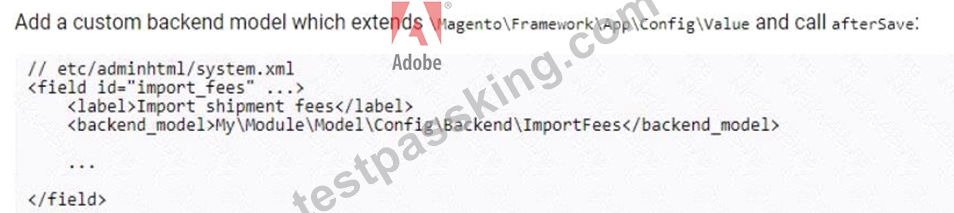
- B.

- C.
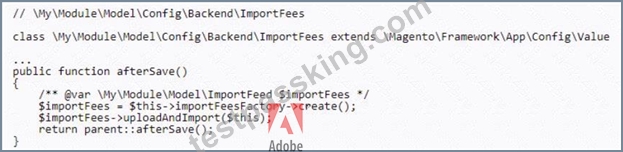
- D.

Answer: A,C
Explanation:
To display the "file upload" field and process the actual CSV import, the following two requirements must be met:
* The developer must create a new system configuration setting that specifies the path to the CSV file.
* The developer must create a new controller action that handles the file upload and import process.
The system.xml file is used to define system configuration settings. The following XML snippet shows how to define a new system configuration setting for the CSV file path:
XML
<config>
<system>
<config>
<shipment_fees_csv_path>/path/to/csv/file</shipment_fees_csv_path>
</config>
</system>
</config>
The Controller\Adminhtml\ShipmentFees controller class is used to handle the file upload and import process.
The following code shows how to create a new controller action that handles the file upload and import process:
PHP
public function uploadAction()
{
$file = $this->getRequest()->getFile('shipment_fees_csv_file');
if ($file->isUploaded()) {
$importer = new ShipmentFeesImporter();
$importer->import($file);
}
return $this->redirect('adminhtml/system_config/edit/section/shipment_fees');
}
NEW QUESTION # 27
For security reasons, merchant requested to a developer to change default admin url to a unique url for every branch/environment of their Adobe Commerce Cloud project.
Which CLI command would the developer use update the admin url?
- A. bin/magento adminuri:set <admin_uri>
- B. magento-cloud variable:set ADMIN_URL
- C. ece-tools variable:update ADMIN_URL
Answer: B
Explanation:
The CLI command that the developer would use to update the admin url is magento-cloud variable:set ADMIN_URL. This command sets an environment variable called ADMIN_URL with a custom value for the admin url on a specific environment. Environment variables are configuration settings that affect the behavior of the Adobe Commerce Cloud application and services. By setting an environment variable for ADMIN_URL, the developer can change the default admin url to a unique url for every branch/environment of their Adobe Commerce Cloud project. Verified Reference: [Magento 2.4 DevDocs]
NEW QUESTION # 28
An Adobe Commerce developer wants to generate a list of products using ProductRepositorylnterf ace and search for products using a supplier_id filter for data that is stored in a standalone table (i.e., not in an EAV attribute).
Keeping maintainability in mind, how can the developer add the supplier ID to the search?
- A. Add a CUStOm filter to the Virtual type
"agento\Catalog\Model\Api\SearchCriteria\CollectionProcessor\ProductFilterProce5sor for supplier_id field. In the custom filter, apply the needed join and filter to the passed $collection. - B. Write a before plugin On \Magento\Framework\Api\SearchCriteria\CollectionProcessorInterface: :
process(). Iterate through the $searchCriteria
provided for supplier_id, and if found, apply the needed join and filter to the passed scollection. - C. Write a before plugin on \Hagento\catalogVtodel\ProductRepository: :geti_ist() and register the search criteria passed. Write an event observer to 0 listen for the event cataiog_product_coiiection_ioad_before. Iterate through the registered search criteria, and if found, apply the needed join and filter to the events scollection.
Answer: A
Explanation:
The developer can add a custom filter to the virtual type
Magento\Catalog\Model\Api\SearchCriteria\CollectionProcessor\ProductFilterProce5sor for supplier_id field.
In the custom filter, the developer can apply the needed join and filter to the passed $collection. This is the recommended way to extend the search criteria for products using dependency injection and plugins. Verified References: [Magento 2.4 DevDocs] [Magento Stack Exchange] In Adobe Commerce, when you need to add a custom filter for a non-EAV attribute stored in a standalone table, the most maintainable approach is to create a custom filter for ProductFilterProcessor. This processor allows for customized search criteria handling, which can be extended to include custom joins and filters without altering core functionality or relying on plugins and observers.
* Why Custom Filter in ProductFilterProcessor is Preferred:
* The ProductFilterProcessor within SearchCriteria\CollectionProcessor is specifically designed to handle filtering of product collections. By extending this with a custom filter, the developer can implement joins and filters on standalone tables.
* This approach is modular and reusable, allowing any code that utilizes ProductRepositoryInterface to apply the supplier_id filter seamlessly.
* Implementation of Custom Filter:
* Define a custom filter class that implements the required logic to join the standalone table and apply the supplier_id filter.
* Register this custom filter with a virtual type in di.xml for ProductFilterProcessor, so it can process the supplier_id as part of the search criteria.
* Why Options A and C are Less Suitable:
* Option A relies on an event observer, which is less modular and may have performance implications since it requires listening to every product collection load event.
* Option C, while functional, involves modifying CollectionProcessorInterface::process(), which is more generic and not specifically tailored for product collection filtering.
* References:
* Magento Developer Documentation on Using Custom Filters in CollectionProcessor
* Magento DevDocs on Dependency Injection and Virtual Types
NEW QUESTION # 29
An Adobe Commerce Cloud merchant has been experiencing significant downtime during production deployment. They have already checked that the application is in ideal state.
In addition to the configuration of the SCD.MATRIX variable to reduce amount of unnecessary theme files, what would be the next steps to reduce the downtime?
- A. 1. Check SCD is configured under deploy phase.
2. Decrease the SCD.THREADS to speed up the build process - B. 1. Check SCD is configured under the build phase.
2. Check if Adobe Commerce Cloud automatically adjusts SCD.THREADS. - C. 1. Check SCD is configured under the build phase.
2. Increase the SCD.THREADS to speed up the build process.
Answer: C
Explanation:
To minimize downtime during deployment, one of the most effective strategies is to configure static content deployment (SCD) to run during the build phase and optimize the number of threads used during the process.
* Configuring SCD in the Build Phase:
* Running SCD during the build phase reduces the amount of work required during the deployment phase, which helps in reducing downtime.
* Increasing SCD.THREADS:
* Increasing the number of threads (SCD.THREADS) speeds up the static content generation by utilizing more parallel processing, which can significantly reduce build time.
* Why Option A is Correct:
* Configuring SCD in the build phase and increasing SCD.THREADS are both recommended practices to minimize deployment time.
* Option B's recommendation to decrease threads would slow down SCD, and Option C does not provide an active approach to adjust thread counts for optimizing the process.
* References:
* Adobe Commerce Cloud documentation on SCD Configuration
NEW QUESTION # 30
An Adobe Commerce Developer is tasked with creating a custom form which submits its data to a frontend controller They have decided to create an action and have implemented the \Magento\Framework\App\Action\HttpPostActioninterface class, but are not seeing the data being persisted in the database, and an error message is being shown on the frontend after submission.
After debugging and ensuring that the data persistence logic is correct, what may be cause and solution to this?
- A. Magento does not allow POST requests to a frontend controller, therefore, the submission functionality will need to be rewritten as an API endpoint.
- B. Form key validation runs on all non-AJAX POST requests, the developer needs to add the for_key to their requests.
- C. The developer forgot to implement a validatePostDataQ method in their action. They should implement this method: all non-validated POST data gets stripped out of the request and an error is thrown.
Answer: B
Explanation:
According to the Magento Stack Exchange answer, form key validation is a security feature that prevents CSRF attacks by checking if the form key in the request matches the one generated by Magento. If the developer does not include the form_key in their custom form, the validation will fail and an error will be shown. Therefore, the developer needs to add the form_key to their requests by using <?= $block->getBlockHtml ('formkey') ?> in their template file. Verified Reference: https://magento.stackexchange.com/questions/95171/magento-2-form-validation
NEW QUESTION # 31
An Adobe Commerce developer is trying to create a custom table using declarative schema, but is unable to do so.
What are two errors in the snippet above? (Choose two.)
- A. Column (roll_no) does not have index. It is needed since attribute identity is set to true.
- B. Column (student_name) does not have attribute length.
- C. Column (entity_id) does not have index. It is needed since attribute identity is set to false.
- D. null is not a valid value for column (roll_no).
Answer: A,B
Explanation:
The correct answers are A and C.
The errors in the snippet are:
* Column roll_no does not have an index. It is needed since attribute_identity is set to true.
* Column student_name does not have an attribute length.
The attribute_identity attribute specifies whether the primary key of the table should be auto-incremented. If attribute_identity is set to true, then the roll_no column must have an index. The student_name column does not have an attribute length, which is required for string columns.
The following code shows how to fix the errors:
XML
<table name="vendor_module_table">
<entity_id>
<type>int</type>
<identity>true</identity>
<unsigned>true</unsigned>
<nullable>false</nullable>
</entity_id>
<roll_no>
<type>int</type>
<identity>false</identity>
<unsigned>true</unsigned>
<nullable>false</nullable>
<primary_key>true</primary_key>
<index>true</index>
</roll_no>
<student_name>
<type>string</type>
<length>255</length>
<nullable>false</nullable>
</student_name>
</table>
Once the errors have been fixed, the table can be created successfully.
NEW QUESTION # 32
There is the task to create a custom product attribute that controls the display of a message below the product title on the cart page, in order to identify products that might be delivered late.
The new EAV attribute is_delayed has been created as a boolean and is working correctly in the admin panel and product page.
What would be the next implementation to allow the is_delayed EAV attribute to be used in the .phtml cart page such as $block->getProduct()->getIsDelayed()?
A)
Create a new file etc/catalog_attributes.xmi:
B)
Create a new file etc/extension attributes.xmi:
Create a new file etc/eav attributes.xmi:
- A. Option C
- B. Option B
- C. Option A
Answer: C
Explanation:
To allow the is_delayed EAV attribute to be used in the .phtml cart page, the developer needs to create a new file called etc/catalog_attributes.xmi. This file will contain the definition of the is_delayed attribute.
The following code shows how to create the etc/catalog_attributes.xmi file:
XML
<?xml version="1.0"?>
<catalog_attributes>
<attribute code="is_delayed" type="int">
<label>Is Delayed</label>
<note>This attribute indicates whether the product is delayed.</note>
<sort_order>10</sort_order>
<required>false</required>
</attribute>
</catalog_attributes>
Once the etc/catalog_attributes.xmi file has been created, the is_delayed attribute will be available in the .phtml cart page. The attribute can be accessed using the getIsDelayed() method of the Product class.
PHP
$product = $block->getProduct();
$isDelayed = $product->getIsDelayed();
The isDelayed variable will contain the value of the is_delayed attribute. If the value of the attribute is 1, then the product is delayed. If the value of the attribute is 0, then the product is not delayed.
NEW QUESTION # 33
An Adobe Commerce developer wants to generate a list of products using ProductRepositorylnterf ace and search for products using a supplier_id filter for data that is stored in a standalone table (i.e., not in an EAV attribute).
Keeping maintainability in mind, how can the developer add the supplier ID to the search?
- A. Add a CUStOm filter to the Virtual type "agento\Catalog\Model\Api\SearchCriteria\CollectionProcessor\ProductFilterProce5sor for supplier_id field. In the custom filter, apply the needed join and filter to the passed $collection.
- B. Write a before plugin On \Magento\Framework\Api\SearchCriteria\CollectionProcessorInterface: :process(). Iterate through the $searchCriteria provided for supplier_id, and if found, apply the needed join and filter to the passed scollection.
- C. Write a before plugin on \Hagento\catalogVtodel\ProductRepository: :geti_ist() and register the search criteria passed. Write an event observer to 0 listen for the event cataiog_product_coiiection_ioad_before. Iterate through the registered search criteria, and if found, apply the needed join and filter to the events scollection.
Answer: A
Explanation:
The developer can add a custom filter to the virtual type Magento\Catalog\Model\Api\SearchCriteria\CollectionProcessor\ProductFilterProce5sor for supplier_id field. In the custom filter, the developer can apply the needed join and filter to the passed $collection. This is the recommended way to extend the search criteria for products using dependency injection and plugins. Verified Reference: [Magento 2.4 DevDocs] [Magento Stack Exchange]
NEW QUESTION # 34
An Adobe Commerce developer is creating a module (Vendor.ModuleName) to be sold on the Marketplace.
The new module creates a database table using declarative schema and now the developer needs to make sure the table is removed when the module is disabled.
What must the developer do to accomplish this?
- A. There is nothing further the developer needs to do. The table will be removed when the when bin/magento module:uninstall vendor_ModuleName is run.
- B. Add a schema patch that implements Magento\Framework\setup\Patch\PatchRevertabieinterface and drops the table in the revert function.
- C. There is nothing further the developer needs to do. The table will be removed when the module is disabled and bin/magento setup:upgrade is run.
Answer: B
Explanation:
According to the Declarative Schema Overview guide for Magento 2 developers, declarative schema is a new feature that allows developers to declare the final desired state of the database and has the system adjust to it automatically, without performing redundant operations. However, declarative schema does not support uninstalling modules or reverting changes. To remove a table when a module is disabled, the developer needs to add a schema patch that implements Magento\Framework\setup\Patch\PatchRevertabieinterface and drops the table in the revert function. The revert function will be executed when the module is disabled using bin/magento module:disable command. Verified References:
https://devdocs.magento.com/guides/v2.3/extension-dev-guide/declarative-schema/
NEW QUESTION # 35
An Adobe Commerce developer creates a new website using a data patch. Each website will have unique pricing by website. The developer does not have visibility into the production and staging environments so they do not know what the configuration currently is.
How would they ensure the configuration is deployed and consistent across all environments?
A)


- A. Option B
- B. Option C
- C. Option A
Answer: A
Explanation:
To ensure that the configuration is deployed and consistent across all environments, the developer can use the following steps:
Create a data patch that contains the configuration for the new website.
Deploy the data patch to all environments.
Use the magento deploy:status command to verify that the configuration has been deployed to all environments.
NEW QUESTION # 36
How would a developer enable the magnification of CSS files on an Adobe Commerce Cloud Staging environment?
- A. Locally from the command line
bin/magento config:set --lock-config dev/css/minify_files 1
Commit the app/etc/config.php file and redeploy. - B. Update the stores > setting > configuration > Advanced > Developer > css configuration in the Admin Panel.
- C. SSH to the Adobe Commerce Staging environment. From the command line

Answer: A
Explanation:
The developer can enable the magnification of CSS files on an Adobe Commerce Cloud Staging environment by locally running the command bin/magento config:set --lock-config dev/css/minify_files 1 from the command line. This will set the configuration value in the app/etc/config.php file and lock it from being changed in the Admin Panel. The developer then needs to commit the app/etc/config.php file and redeploy the environment. Verified References: [Magento 2.4 DevDocs] 2
NEW QUESTION # 37
An Adobe Commerce developer added a new API method to search and retrieve a list of Posts for a custom Blog functionality. This is the content of the module's etc/webapi.xml file:
The new code has been deployed to production and the merchant is using https: //merchant. domain. com
/swagger to review the new endpoint, but it is not visible in swagger.
What would be a reason for this?
- A. The webapi.xml file should be moved into the etc/webapi_rest/webapi.xml file.
- B. The greturn annotation is missing in the MyVendor\Blog\Api\PostRepositoryInterf ace class.
- C. Since the new endpoint is not anonymous, the merchant needs to enter a valid integration token in swagger in order to see the new method.
Answer: C
Explanation:
In Adobe Commerce, when defining new API endpoints through the webapi.xml configuration file, the visibility of these endpoints in tools like Swagger (now OpenAPI) depends on several factors, including authentication settings. According to the provided webapi.xml file:
<?xml version="1.0"?>
<routes xmlns:xsi="http://www.w3.org/2001/XMLSchema-instance"
xsi:noNamespaceSchemaLocation="urn:magento:module:Magento_Webapi:etc/webapi.xsd">
<route url="/V1/myvendor-blog/post/search" method="GET">
<service class="MyVendor\Blog\Api\PostRepositoryInterface" method="getList"/>
<resources>
<resource ref="MyVendor_Blog::Post_View"/>
</resources>
</route>
</routes>
* Option A suggests moving the file to etc/webapi_rest/webapi.xml. However, this is incorrect because Adobe Commerce does not require separate XML files for REST and SOAP APIs in this context. The webapi.xml is used for defining routes for both. The structure and location provided in the question are correct for defining REST API routes.
* Option B is the correct answer. The resource reference MyVendor_Blog::Post_View indicates that this API endpoint is not anonymous; it requires authentication. In Adobe Commerce, if an API endpoint requires authentication, it won't be visible in Swagger (or the OpenAPI UI) unless you provide valid authentication credentials or tokens. This is part of Magento's security model where protected resources require tokens or OAuth to access. For the merchant to see this endpoint in Swagger, they must provide an integration token or OAuth token which has permissions for MyVendor_Blog::Post_View. This is detailed in the Adobe Commerce Developer Documentation under [Web API Authentication](https://x.
com/i/grok?text=Web%20API%20Authentication).
* Option C mentions the @return annotation missing in the interface class. While proper annotations in PHPDoc are important for IDE autocompletion and documentation generation, they are not directly related to the visibility of an endpoint in Swagger. The visibility in Swagger is determined by the configuration in webapi.xml and the authentication settings, not by PHPDoc annotations. Thus, this option is incorrect in the context of the question.
For further reading on how to manage and configure API endpoints in Adobe Commerce, including authentication, refer to the official Adobe Commerce Developer Guide:
* Web API Configuration
* Web API Authentication
* Swagger Integration for testing and documenting APIs.
This explanation covers the necessary aspects of Adobe Commerce API development, focusing on the configuration, authentication requirements, and how these affect the visibility of API endpoints in development tools like Swagger.
NEW QUESTION # 38
ECE-Tools provides a set of tools that can be used to manage and maintain your Adobe Commerce Cloud environment. What are some of the features provided by ECE-Tools?
- A. Builds application, Applies custom patches and Dump configuration for static content deployment.
- B. Fastly configuration, Applies custom patches and Dump configuration for static content deployment.
- C. Builds application, Applies custom patches, and Shows the list of S3 backup tar.gz files.
Answer: A
Explanation:
Some of the features provided by ECE-Tools are building application, applying custom patches, and dumping configuration for static content deployment. ECE-Tools is a set of scripts and tools designed to manage and deploy Adobe Commerce Cloud projects. It provides commands for building application code, applying patches for Magento core issues or custom modules, and dumping configuration settings for static content deployment optimization. Verified Reference: [Magento 2.4 DevDocs] 2
NEW QUESTION # 39
How would a developer turn on outgoing emails on an Adobe Commerce Cloud Staging environment?
- A. Access the Project Web Interface and select the Staging environment.
Select Configure environment.
Toggle Outgoing emails On - B. From the command line
ece-tools enable_smtp true - C. From the command line
magento-cloud environment:info -p <project-id> -e <environment-id> enable_smtp true
Answer: A
Explanation:
The developer can turn on outgoing emails on an Adobe Commerce Cloud Staging environment by accessing the Project Web Interface and selecting the Staging environment. Then, the developer can select Configure environment and toggle Outgoing emails On. This will enable the SMTP service for the Staging environment and allow emails to be sent from the application. Verified References: [Magento 2.4 DevDocs] 1 In Adobe Commerce Cloud, email functionality for Staging and Production environments can be controlled through the Project Web Interface. To enable outgoing emails, you can toggle the setting from within the environment configuration.
* Using the Project Web Interface:
* Navigate to the Project Web Interface, select the Staging environment, and configure the environment settings. Here, you can enable or disable outgoing emails with a simple toggle.
* Why Option C is Correct:
* This method directly interacts with Adobe Commerce Cloud's environment settings through the GUI. Options A and B are not valid commands in Adobe Commerce Cloud for enabling SMTP or email.
* References:
* Adobe Commerce Cloud documentation on Managing Email Settings
NEW QUESTION # 40
An Adobe Commerce Cloud project is using Enhanced Integration Environments with two install a new payment module.
The developer is using Cloud CLI for Commerce tool.
What would a developer do to test this new feature under the integration environment?
- A. 1. Deactivate one of the active integration environment branches.
2. Create a new active branch from integration and install the module.
3. Push the changes. - B. 1. Create a new branch from integration and install the module.
2. Push the changes.
3. Branch active status check is not necessary. - C. 1. Duplicate one of the integration environment branches.
2. Create a new active branch from integration and install the module.
3. Push the changes.
Answer: A
Explanation:
The developer can test the new feature under the integration environment by deactivating one of the active integration environment branches, creating a new active branch from integration and installing the module, and pushing the changes. This is because Enhanced Integration Environments have a limit of four active branches at a time, and each branch has its own dedicated database and services. The developer can use the Cloud CLI for Commerce tool to manage the branches and deploy the code changes. Verified References:
[Magento 2.4 DevDocs] 1
NEW QUESTION # 41
An Adobe Commerce Developer has written an importer and exporter for a custom entity. The client is using this to modify the exported data and then re-importing the file to batch update the entities.
There is a text attribute, which contains information related to imagery in JSON form, media_gallery. This is not a field that the client wants to change, but the software they are using to edit the exported data seems to be modifying it and not allowing it to import correctly.
How would the developer prevent this?
A) Specify a serializer class for the attribute using the $_transformAttrs class property array for both the exporter and importer so it gets converted:
B) Strip the attribute from the imported file by adding it to the s_strippedAttrs class property array: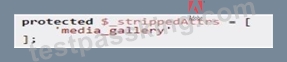
C) Prevent it from being exported by adding it to the $_disat>iedAttrs class property array:
- A. Option B
- B. Option A
- C. Option C
Answer: C
Explanation:
To prevent the media_gallery attribute from being exported as part of the custom entity's data, the developer should add this attribute to the $_disabledAttrs class property array. This effectively excludes the attribute from the export process, ensuring that it does not appear in the exported file and thus will not be modified or re-imported inadvertently.
Option C is correct for the following reasons:
* Preventing Export with $_disabledAttrs:Adding media_gallery to the $_disabledAttrs array tells the system to skip this attribute during export. This prevents the attribute from being included in the export file, thus removing the risk of it being altered by external software that handles the file. Since the attribute will not be present in the exported data, it will remain unchanged in the database when re- importing.
* Explanation: The $_disabledAttrs property is specifically designed to exclude certain attributes from the export process. By using this property, you ensure that attributes not intended for editing or visibility in exports are safely omitted, maintaining data integrity.
* References: The Adobe Commerce documentation on import/export processes outlines how
$_disabledAttrs can be used to filter out sensitive or unnecessary attributes from export files.
* Alternative Options and Their Limitations:
* Option A: Using $_transformAttrs with a serializer is useful for encoding or decoding attribute data during export/import, but it does not prevent the attribute from being included in the export.
This would only help if the media_gallery data needed transformation, not exclusion.
* Option B: $_strippedAttrs is applicable for filtering attributes from the imported file, not the exported file. It would not stop the attribute from being included in the export and hence does not align with the need to prevent modifications during export.
By configuring $_disabledAttrs, the developer effectively ensures the media_gallery attribute remains unmodified by preventing it from being included in export files altogether.
NEW QUESTION # 42
An Adobe Commerce Cloud merchant has been experiencing significant downtime during production deployment. They have already checked that the application is in ideal state.
In addition to the configuration of the SCD.MATRIX variable to reduce amount of unnecessary theme files, what would be the next steps to reduce the downtime?
- A. 1. Check SCD is configured under deploy phase.
2. Decrease the SCD.THREADS to speed up the build process - B. 1. Check SCD is configured under the build phase.
2. Check if Adobe Commerce Cloud automatically adjusts SCD.THREADS. - C. 1. Check SCD is configured under the build phase.
2. Increase the SCD.THREADS to speed up the build process.
Answer: C
Explanation:
The next steps to reduce the downtime are to check that the SCD is configured under the build phase and to increase the SCD.THREADS to speed up the build process. The SCD stands for static content deployment, which is the process of generating and deploying static files such as CSS, JS, images, etc. By configuring the SCD under the build phase, the static files are generated before the code is deployed to the production environment, which reduces the downtime during deployment. The SCD.THREADS is a variable that determines how many threads are used for parallel processing during the SCD. By increasing the SCD.THREADS, the developer can improve the performance and efficiency of the SCD process. Verified References: [Magento 2.4 DevDocs] 12
NEW QUESTION # 43
An Adobe Commerce developer has created a new shipping carrier Everything has been implemented and the collectRates() and getAllowedMethodsQ functions can be seen below: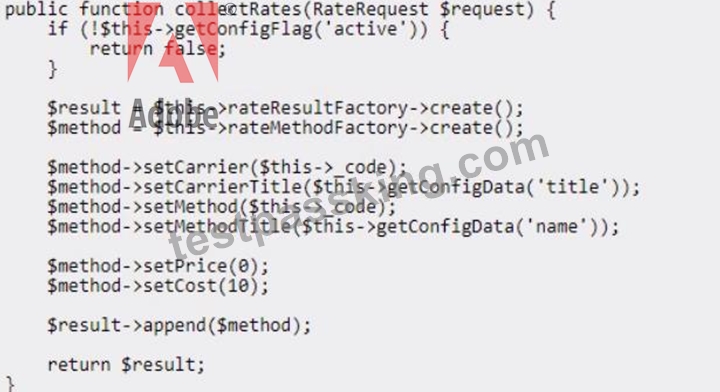

Given the above code, what would be the displayed cost of the shipping method and final amount charged to the customer?
- A. The shipping method would display $0 and customers would pay $0 for using the new shipping method.
- B. The shipping method would display SO but customers would pay a $10 handling fee for their order.
- C. The shipping method would display $10 and customers would pay $10 for using the new shipping method.
Answer: A
NEW QUESTION # 44
An Adobe Commerce developer has created a before plugin for the save() function within the Magento\Framework\App\cache\Proxy class. The purpose of this plugin is to add a prefix on all cache identifiers that fulfill certain criteria.
Why is the plugin not executing as expected?
- A. Cache identifiers are immutable and cannot be changed.
- B. Another around plugin defined for the same function does not call the callable.
- C. The target ClaSS implements Magento\Framework\ObjectManager\NoninterceptableInterface.
Answer: C
Explanation:
According to the Plugins (Interceptors) guide for Magento 2 developers, plugins are class methods that modify the behavior of public class methods by intercepting them and running code before, after, or around them. However, some classes in Magento 2 implement the NoninterceptableInterface interface, which prevents plugins from being generated for them. The Magento\Framework\App\cache\Proxy class is one of them, as it extends from Magento\Framework\ObjectManager\NoninterceptableInterface. Therefore, the plugin is not executing as expected because the target class implements NoninterceptableInterface. Verified Reference: https://devdocs.magento.com/guides/v2.3/extension-dev-guide/plugins.html
NEW QUESTION # 45
There is the task to create a custom product attribute that controls the display of a message below the product title on the cart page, in order to identify products that might be delivered late.
The new EAV attribute is_delayed has been created as a boolean and is working correctly in the admin panel and product page.
What would be the next implementation to allow the is_delayed EAV attribute to be used in the .phtml cart page such as $block->getProduct()->getIsDelayed()?
A)
Create a new file etc/catalog_attributes.xmi:
B)
Create a new file etc/extension attributes.xmi:
C)
Create a new file etc/eav attributes.xmi:
- A. Option C
- B. Option B
- C. Option A
Answer: C
Explanation:
To allow the is_delayed EAV attribute to be used in the .phtml cart page, the developer needs to create a new file called etc/catalog_attributes.xmi. This file will contain the definition of the is_delayed attribute.
The following code shows how to create the etc/catalog_attributes.xmi file:
XML
<?xml version="1.0"?>
<catalog_attributes>
<attribute code="is_delayed" type="int">
<label>Is Delayed</label>
<note>This attribute indicates whether the product is delayed.</note>
<sort_order>10</sort_order>
<required>false</required>
</attribute>
</catalog_attributes>
Once the etc/catalog_attributes.xmi file has been created, the is_delayed attribute will be available in the
.phtml cart page. The attribute can be accessed using the getIsDelayed() method of the Product class.
PHP
$product = $block->getProduct();
$isDelayed = $product->getIsDelayed();
The isDelayed variable will contain the value of the is_delayed attribute. If the value of the attribute is 1, then the product is delayed. If the value of the attribute is 0, then the product is not delayed.
NEW QUESTION # 46
An Adobe Commerce developer is tasked to add a file field to a custom form in the administration panel, the field must accept only .PDF files with size less or equal than 2 MB. So far the developer has added the following code within the form component xml file, inside the fieldset node: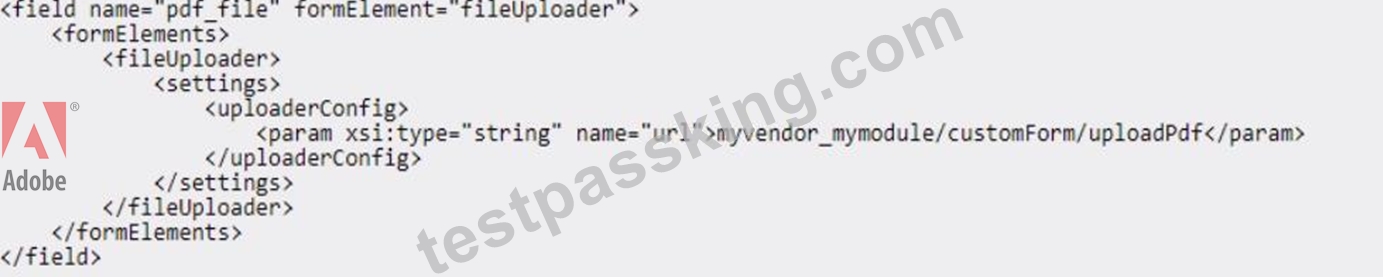
How would the developer implement the validations?
A)
Add the Validations Within the HyVendor\MyModule\Controller\Adminhtml\CustomEntity\UploadPdf Controller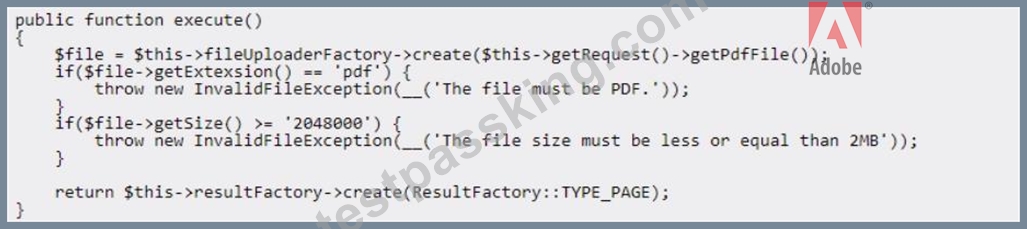
B)
Add a virtual type forMyvendor\MyModuie\Modei\customPdfupioader specifying the aiiowedExtensions and the maxFiiesize for the constructor, within the module's di.xmi:
C)
Add the following code inside the<settings> node:
- A. Option B
- B. Option A
- C. Option C
Answer: C
Explanation:
To add file upload validation for a custom form field in the Adobe Commerce admin panel, which should restrict the file type to .pdf and limit the file size to 2 MB, the recommended approach is to include the validation parameters directly within the <settings> node in the form's XML configuration. This ensures that the validation occurs on the client-side as well as server-side, providing immediate feedback to users before submission.
Option C is correct for the following reasons:
* Adding Validation Inside <settings>:By placing the <allowedExtensions> and <maxFileSize> tags within the <settings> node of the XML configuration, the system will enforce these restrictions directly within the form component. This method leverages Magento's built-in support for validation settings, which ensures that only files matching the specified criteria (.pdf files of 2 MB or smaller) are accepted by the form.
* Explanation: Magento UI components allow for client-side validation through the <settings> node, where attributes such as allowedExtensions and maxFileSize are used to control file upload constraints. This approach not only validates the file size and type but also integrates seamlessly with Magento's front-end validation mechanisms.
* References: Magento's documentation on UI components highlights how to enforce file type and size restrictions through XML configurations within <settings>, making it the standard and most efficient solution for this task.
* Alternatives and Limitations:
* Option A: Adding validation within the controller (UploadPdf) can provide additional server- side validation, but this does not prevent the user from selecting invalid files in the first place.
Server-side validation alone lacks the user experience enhancement provided by client-side feedback.
* Option B: Configuring a virtual type in di.xml for validation (e.g., setting allowedExtensions and maxFileSize within a custom uploader model) is effective for backend processing but is not as straightforward for direct form validation within the admin UI. It complicates the implementation by requiring custom backend logic where native XML validation can suffice.
Option C provides a straightforward, maintainable, and user-friendly way to implement file validation directly in the form configuration. It reduces the need for custom controller or model logic and leverages Magento's built-in form handling capabilities.
NEW QUESTION # 47
......
Adobe AD0-E716 Exam Syllabus Topics:
| Topic | Details |
|---|---|
| Topic 1 |
|
| Topic 2 |
|
| Topic 3 |
|
| Topic 4 |
|
| Topic 5 |
|
| Topic 6 |
|
| Topic 7 |
|
| Topic 8 |
|
| Topic 9 |
|
| Topic 10 |
|
Adobe Commerce -AD0-E716 Exam-Practice-Dumps: https://www.testpassking.com/AD0-E716-exam-testking-pass.html
AD0-E716 Premium Files Test pdf - Free Dumps Collection: https://drive.google.com/open?id=1ZrvyLyMEGQz8MfA-oQx-VAIc6AXhcpAw